Six practical document tools. Hosted in Sydney.

Document signing and secure file exchange for Australian businesses, without enterprise pricing.

E-Sign, client uploads, secure sharing, reusable PDF templates, Smart Forms and two-way exchange in one platform. A$19.99 per organisation per month including GST, with your documents and account data stored in Sydney.

A$19.99 a month, GST included Speed up document turnaround Australian tax invoice every month Make it easier for clients Keep document work organised
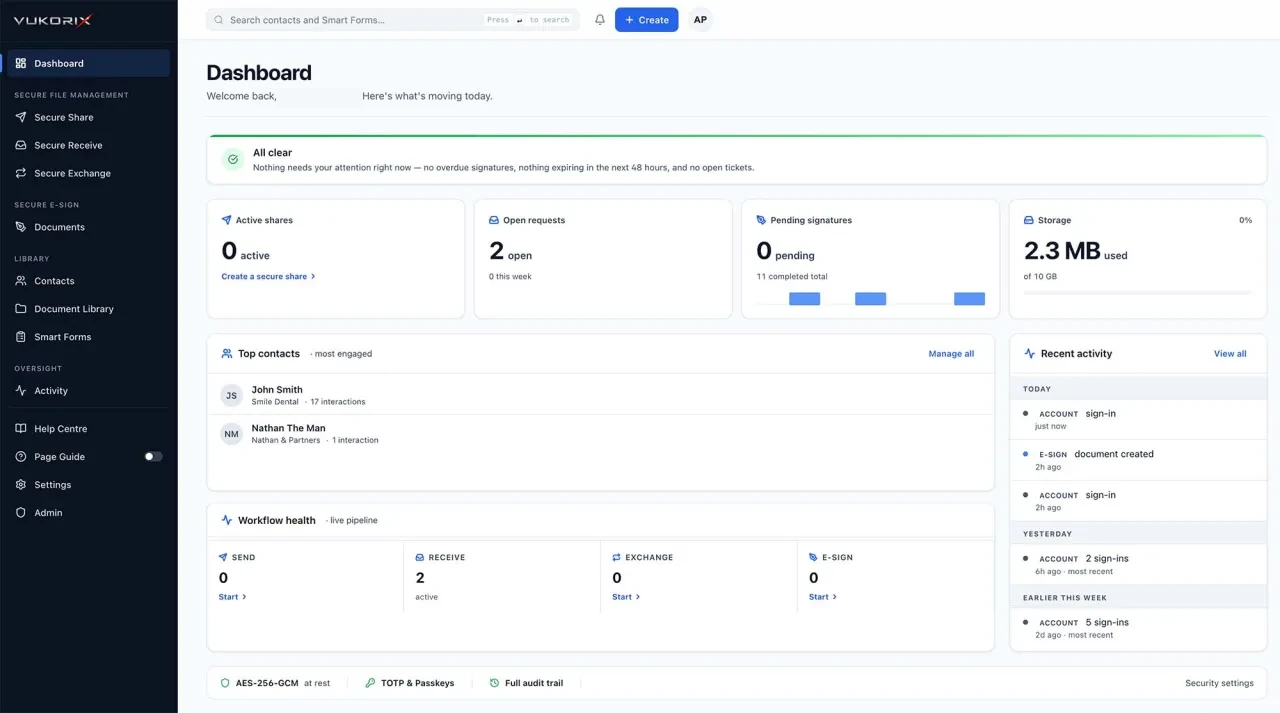
Vukorix dashboard showing document workflows and recent activity
Products

Six practical tools for everyday document work.

Send for signature, reuse a template, build a client form, share a sensitive file, request documents or manage a two-way exchange.

E-Sign

Upload your PDF, place signature fields, and send. One signer or many, an audit certificate on every document, and a downloadable signed PDF. Mark up, comment, and black out sensitive text on the same page where you set up the signature.

Explore E-Sign →

Document Library

Reusable PDF templates organised in folders, with your most-used templates pinned to the top. One click starts a fresh draft from any template, ideal for agency agreements, engagement letters, credit guides, and consent forms.

Explore Document Library →

Secure Share

Encrypted links that expire automatically after a set number of views or by a deadline, protected by an optional password or PIN. Turn on Private mode and the file is locked in your browser before it leaves your computer. Vukorix has no access to it.

Explore Secure Share →

Secure Receive

A branded upload portal with a checklist for clients, useful for identity documents, payslips, and the supporting paperwork a file always seems to be missing. In Private mode, uploads are locked in your client's browser and tied to your account. Only you can unlock them.

Explore Secure Receive →

Secure Exchange

A two-way workflow for collecting documents from a client and sending documents back. Secure Exchange supports Standard encryption and Private mode for supported file transfers.

Explore Secure Exchange →

Smart Forms

Turn any PDF into an on-screen form your client fills, then get back a completed PDF. Works with PDFs that already have fillable fields, and our AI picks fields out of flat scanned PDFs too. Attach to any Secure Receive request.

Explore Smart Forms →
Protection that fits the workflow

Use the right protection for each workflow.

Standard encryption supports the full Vukorix workflow. Private mode adds browser-side encryption for supported file transfers.

Standard encryption

Use the full Vukorix workflow.

Files are encrypted in transit and at rest while automated Vukorix systems perform the processing required for signatures, forms, previews and other workflow features.

Your document Secure automated processing Completed workflow
  • E-Sign and audit certificates
  • Smart Forms
  • Document mark-up and PDF export
  • Document Library templates
  • Document previews
  • Exchange messaging
Private mode

Use browser-side encryption for supported file transfers.

The file is encrypted in your browser before upload. Vukorix stores only the encrypted version, and the recipient unlocks it using the required link information or their account.

Encrypted in your browser Encrypted file stored Recipient unlocks the file
  • Secure Share file transfers
  • Secure Receive uploads
  • Supported Secure Exchange file transfers
  • Optional filename hiding
  • Recipient access without a Vukorix account
How Vukorix compares

Built for the work Australian firms actually do.

Most teams pay for these workflows as separate products, each with its own plan, its own invoice and its own per-user maths. Vukorix includes them in one plan, priced per organisation and billed in Australian dollars with GST included.

Outcome Vukorix DocuSignPandaDocAdobe SignDropbox SignShareFile
One affordable monthly plan A$19.99/month incl. GST Per-user Per-user Per-user Per-user Plan-based
4 seats included 4 seats Per user Per user Per user Per user Per plan
E-signing with audit trail Add-on
Secure file sharing Separate product Separate product Separate product Separate product
Client upload portal Higher tier Higher tier Higher tier Separate product
Reusable document library Higher tier Higher tier Higher tier Separate product Separate product
Smart Forms Higher tier Higher tier Higher tier Separate product Separate product
Secure two-way exchange Separate tools Separate tools Separate tools Separate tools Separate tools
No upgrade gates for core workflows Tiered plans Tiered plans Tiered plans Tiered plans Tiered plans

Swipe sideways to compare

included in the one Vukorix plan. not in one affordable plan (separate product, higher tier, add-on or per-user). Pricing and packaging can change. How we compare. Vukorix is priced per organisation in Australian dollars with GST included; compare the unit and the tax basis, because the other providers listed are priced per user or per plan and their published prices may be quoted in another currency or exclude GST. Product capabilities and pricing vary by plan, region and date. Review each provider's current documentation before making a purchasing decision.

DocuSign, PandaDoc, Adobe, Adobe Acrobat, Adobe Acrobat Sign, Dropbox Sign, ShareFile and other third-party product names are trademarks of their respective owners. Vukorix is independent and is not affiliated with, endorsed by, or sponsored by those companies.

How it works

Three steps. No account required for your clients.

Pick the workflow

Start a Secure Share, set up a Secure Receive request, open a two-way Secure Exchange, send a document for signature, or start a new draft from a Document Library template.

Choose your mode

Standard encryption for the workflows that need Vukorix to read the document. Private mode for the files where Vukorix should have no access to the contents. You pick per workflow, before you send.

Track to completion

Recipients open a branded page, no account required. You watch each step from your dashboard. When it's done, you download the files, the signed PDF, or the audit certificate.

Pricing

Straightforward pricing. No upgrade gates.

Vukorix Business

Useful document tools at one fair price.

Vukorix Business includes document signing, client uploads, secure sharing, reusable PDF templates, Smart Forms and two-way exchange.

A$ 19.99 / month

Per organisation, not per user. Australian dollars, GST included. 4 seats included. Extra seats are A$5.99/month. 7-day free trial, no credit card required.

Start your 7-day free trial
What your team gets
Keep signatures moving

Send PDFs, track progress and receive the completed document with an audit certificate.

Give clients a better way than email attachments

Send and collect identity documents, payslips and signed forms through controlled links, instead of asking clients to return them as email attachments.

Spend less time chasing documents

Use checklists and workflow status to see what is complete and what still needs attention.

Reuse approved documents

Keep your agency agreements, engagement letters and consent forms ready to send, and start a fresh workflow without uploading the same file again.

Make existing PDFs easier to complete

Add the fields your client needs to a tenancy application, an intake form or a consent form, send it through Vukorix and receive the completed PDF back.

Keep costs predictable as your team grows

Four seats are included. Extra seats cost A$5.99/month each, without moving to a higher plan. You are billed in Australian dollars by Osmicro Networks Pty Ltd (ABN 70 642 841 638), with an Australian tax invoice for every payment.

See full pricing details →

Industries

Built for Australian firms that handle real client documents.

Vukorix was designed for the practices that send agreements for signature, collect identity documents, and exchange settlement paperwork every day, with stakes that matter.

Frequently asked

Clear answers to the questions buyers ask most.

How does Vukorix protect my documents?

Vukorix offers two modes. Standard encryption stores your files on Vukorix servers with AES-256. It's used for E-Sign, Smart Forms, blackout, document previews, and the Document Library, where Vukorix needs to read the document. Private mode is end-to-end encrypted for Secure Share, Secure Receive, and Secure Exchange (files in both directions): your browser locks the file before it leaves your computer, and Vukorix only ever stores the encrypted version. Everything is also encrypted in transit when it travels over the internet.

See the full security architecture →

Where are my documents stored?

Your documents and account data are stored in Sydney. The Vukorix application, its database and the files you upload all sit in an Australian region, and you contract with Osmicro Networks Pty Ltd (ABN 70 642 841 638), a company registered in New South Wales. Personal information is primarily hosted in Australia, but some sub-processors, for example Google Analytics and our transactional email provider, process data in the United States or other countries. Our current key sub-processors and the countries they operate in are listed in the Privacy Policy.

Is everything on Vukorix end-to-end encrypted?

No. Private mode is end-to-end encrypted for Secure Share, Secure Receive, and Secure Exchange (files in both directions). E-Sign, Smart Forms, blackout, document previews, the Document Library, and Standard Exchange messaging use Standard encryption (encrypted on Vukorix servers) because Vukorix needs to read the document to perform those workflows.

Are electronic signatures legally binding in Australia?

In most cases, yes. Electronic signatures have been recognised in Australia since the Electronic Transactions Act 1999 (Cth), and every state and territory has its own electronic transactions legislation closely modelled on it, though the detail and the exemptions differ between jurisdictions. Since 2022, companies registered under the Corporations Act 2001 (Cth) have been able to sign documents, including deeds, electronically, and to use split execution. The law is technology-neutral: what matters is that the method identifies the signatory, indicates their intention, is as reliable as appropriate for the purpose, and that the other party accepts it. An audit trail does not make a signature valid, but it helps you prove it was. Some documents are different. Wills, enduring powers of attorney, appointments of enduring guardian, affidavits and state statutory declarations have their own rules that vary by state, and in several states still need a wet-ink signature and an in-person witness. Land title dealings go through the separate electronic conveyancing system and are signed by your lawyer or conveyancer. This is general information, not legal advice. Get your own advice for any document that must be witnessed, sworn or affirmed, or that has special execution requirements.

What does Vukorix replace?

Vukorix consolidates e-signature, secure file sharing, client document request portals, and reusable PDF template libraries into one flat A$19.99 per month plan for the whole organisation, GST included, with 4 seats included.

How much does Vukorix cost?

A$19.99 per organisation per month, in Australian dollars and including GST. Includes 4 seats in total; the organisation owner uses one, leaving three for team members. Extra seats are A$5.99 each per month, also including GST. Unlimited signatures, unlimited shares, unlimited exchanges, with 2 GB of organisation storage included. 7-day free trial, no credit card required. You are billed from Australia by Osmicro Networks Pty Ltd (ABN 70 642 841 638), with an Australian tax invoice for every payment.

Can I use my existing PDF forms with Smart Forms?

Yes. If your PDF already has fillable fields built in, Vukorix picks them up automatically with their original positions and types. A green banner confirms when it worked. If your PDF is a flat scan with no built-in fields, our AI finds the fields by looking at the page and you do a quick alignment check in the editor before sending. Smart Forms uses Standard encryption because Vukorix needs to read your PDF to set up and process the form.

Does Vukorix do PDF redaction?

Yes: permanent blackout for PDFs. Inside the Smart Forms editor and the E-Sign edit page, you draw rectangles over the text you want to hide. Vukorix re-renders the page as an image so nothing under the blackout can be copied, pasted, or recovered. It's a manual tool. Vukorix doesn't automatically scan for sensitive data. Word and Excel files must be saved as PDF first.

Can Vukorix recover a Private mode file if I lose access?

No. Private mode is designed so that Vukorix has no access to the file, and never holds its unlock key. The key either lives inside the link you share, or is tied to the recipient's account. Keep the recipient link and any passwords safe.

Is Vukorix audited?

Vukorix engineering documentation, code, and architecture are tracked in detail. Vukorix is not SOC 2 certified, and an independent external cryptographic audit has not been completed at this time; we will publish the external-audit status when one is available. Until then, our public claims (SOC 2-ready architecture and GDPR-aligned design) are deliberately scoped to architectural properties we can demonstrate in code. Separately, Osmicro Networks Pty Ltd handles personal information under the Privacy Act 1988 (Cth) and the Australian Privacy Principles, the Notifiable Data Breaches scheme applies, and the OAIC is the avenue for privacy complaints.

What sign-in methods does Vukorix support?

Email and password with extra verification required, Sign in with Google, Sign in with Microsoft, passkeys, authenticator apps (Google Authenticator, Authy, 1Password, etc.), and SMS codes to Australian mobile numbers. Every action your team takes is logged in the audit trail, no matter which sign-in method was used.

What's a Document Library "template"?

A template is a reusable PDF stored in your Document Library: an agency agreement, an engagement letter, a credit guide, a privacy collection notice, a standard NDA. You store the PDF once, then click Use template to start a fresh E-Sign draft any time you need to send it to a new client. The original template stays untouched. Templates use Standard encryption. They're stored on Vukorix servers with AES-256, because Vukorix needs to read the PDF to start new drafts from it.

Does Vukorix integrate with my CRM or practice software?

No. Vukorix is currently focused on clean standalone document workflows, and does not integrate with practice management, trust accounting or conveyancing systems. Teams can download completed files and audit packs and file them in the systems they already use. Integrations can be considered based on customer demand.

Try Vukorix free for 7 days.

No credit card required. Send your first signature, exchange, or share in under five minutes. After the trial it is A$19.99 per organisation per month, GST included.