Accountants, bookkeepers and consultants

Handle client documents without rebuilding the same process every quarter.

Send engagement letters for signature, collect what you need to take on a new client, and keep approved PDFs ready for the work that comes round every BAS quarter and every 30 June.

A$19.99 per organisation per month, including GST. 4 seats included. No credit card required.

Why Vukorix

Standardise the document work your practice repeats every quarter.

Reuse approved documents

Keep engagement letters, terms of engagement and authority forms as approved templates, and start from the same PDF each time.

Make new client take-on clearer

Send one request covering the identification you need for your proof-of-identity checks, along with the trust deed or ASIC paperwork behind the entity.

Keep approvals moving

Send engagement letters, minutes and resolutions for signature, and see what is still outstanding before the deadline.

Document Library

Keep your standard PDFs ready for the same job next year.

Store the engagement letter, terms of engagement and authority forms your practice has approved, then start a fresh E-Sign draft for each client while the library copy stays unchanged.

  1. Upload the approved PDF
  2. Organise it in the shared library
  3. Start a fresh draft when needed
Explore Document Library →
Secure Receive

Collect new client documents through one request.

One checklist and one upload link for identification, prior year financial statements, BAS records, ASIC company documents or a trust deed — so clients know what to provide and your team can see what is still outstanding. Uploads are stored in Sydney.

  1. List the documents you need
  2. Send one client request link
  3. Review what has arrived
Explore Secure Receive →
E-Sign

Send engagement letters and client declarations for signature.

Prepare the PDF, notify the recipients, and keep the signed document and its audit certificate together on the client file. Signing requirements vary by document type and jurisdiction, so check what applies to yours.

  1. Upload the PDF and place the fields
  2. Send the signing link
  3. Download the completed document
Explore E-Sign →
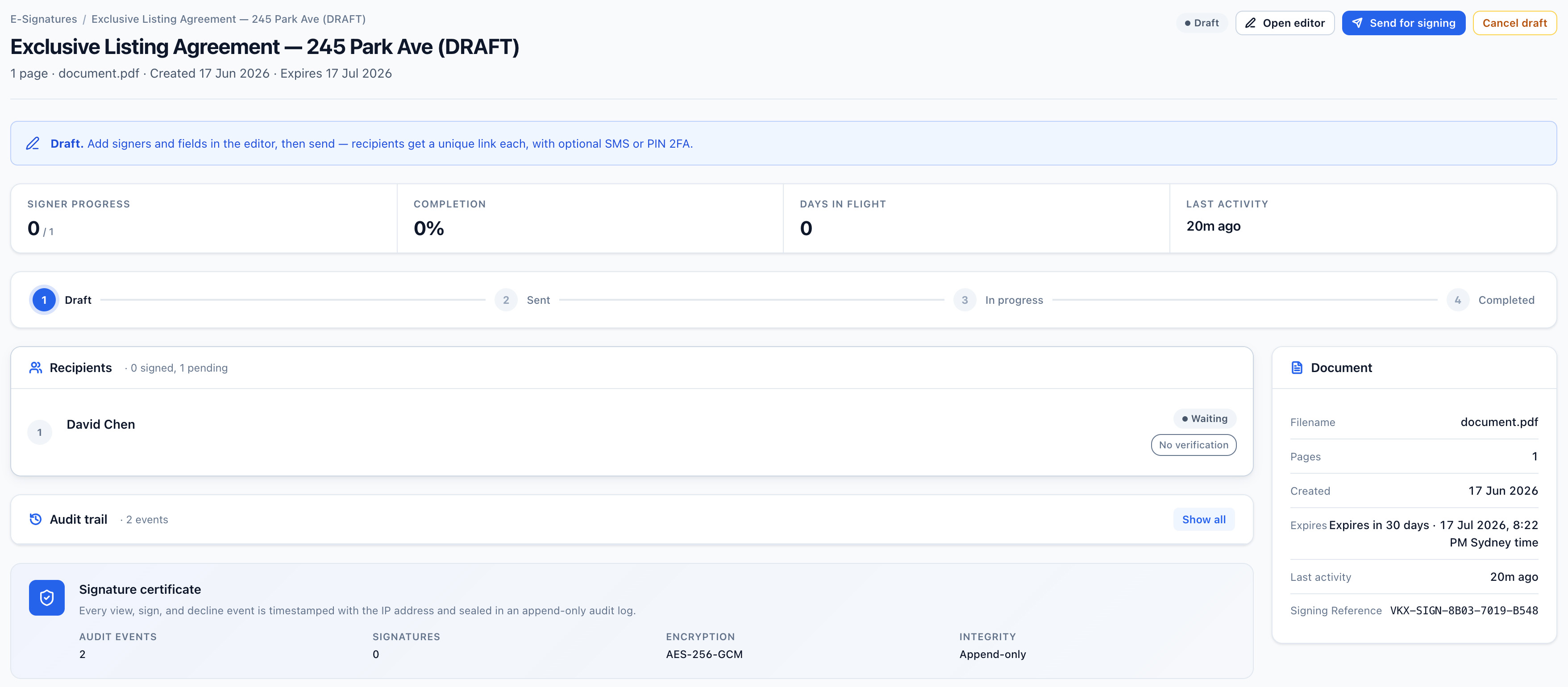
Vukorix E-Sign document overview showing signer progress, audit trail and signature certificate for a document out for signature
For clients

A simpler document experience for every client.

Clients receive one clear link for the form, signature, upload, or file they need to deal with — which matters when the same request goes out to your whole client list in the same fortnight.

Recommended Vukorix tools: Document Library · Secure Receive · E-Sign · Secure Share

FAQ
Which professional-services businesses can use Vukorix?

Vukorix suits registered tax agents and BAS agents, bookkeepers, consultants, agencies, and other client-facing firms that send, collect, and reuse the same documents every quarter and every year.

Can I reuse engagement letters and standard PDFs?

Yes. Document Library keeps approved PDF templates — engagement letters, terms of engagement, authority forms — ready so your team can start a fresh E-Sign draft for each client.

Do clients need a Vukorix account?

For most recipient tasks, no. Clients open the link to sign, upload, complete, or access the requested document.

Does Vukorix replace our professional or record-retention obligations?

No. Your practice remains responsible for its own obligations: if you are a registered tax or BAS agent, those under the Tax Agent Services Act 2009 (Cth) and the Tax Practitioners Board Code of Professional Conduct, and for every firm those under the Privacy Act 1988 (Cth) and your own record-retention requirements. Vukorix collects and stores the documents you ask for; it does not carry out your proof-of-identity or client verification checks for you.

Make the client paperwork that comes round again easier.

Try every Vukorix product for 7 days. No credit card required.